
Adaptive Service Changelog

System update – Calendar 🗓️
Release date: 2025-11-05
Extended calendar features and access in the mobile app
The latest update of our application brings a number of improvements to the service calendar. The goal is to make planning easier and to help manage service orders better – both for dispatchers and for field technicians.
Calendar available in the mobile app
The most important new feature is full integration of the calendar with the mobile app.
Technicians can now check which orders are scheduled for a given day directly on their mobile device. This makes it easier to keep track of the work schedule and to react quickly to any changes in the plan.

Scheduling order dates
The new feature lets technicians set their own dates for completing orders.
Each order still has a deadline assigned, while the schedule can be set by the dispatcher or, optionally, by the technician.
Scheduling by technicians is disabled by default, but it can be enabled at the company’s request.

New calendar view for dispatchers
Dispatchers now have an extended calendar view that makes it easier to review and organize schedules. It includes:
- filtering by schedule type (dispatcher’s or technician’s),
- filtering by date range,
- switching between views – the standard view and a view showing orders assigned to a specific technician.

Improvements in everyday work
These changes are designed to make day-to-day work easier to organize and task planning more transparent.
We encourage you to try the new features and share your feedback – every suggestion helps us develop the system in the direction that best supports service management.
System update – History and tables 🔢
Release date: 2025-11-18
Version 217 is here! See what we have changed
We have a fresh update for you – version 217, which introduces two features that make everyday service work much easier.
Better order history
The order history is now split into pages, so it loads faster and is much easier to navigate.
Most importantly, a technician on site now has access to the full history from the last 14 months, including photos, notes and forms – also from orders completed by other technicians.
The result? A clear, complete picture of the situation on site, without searching for information outside the app.

More advanced tables in forms
We have extended the options for defining conditions and calculations in tables. This lets you build more flexible and precise forms that better reflect the processes carried out on an order.

Changes inspired by our users’ needs
The new features were built around our users’ real needs and are meant to make everyday work easier, especially when creating forms and reviewing order history.
We are always happy to consider further suggestions for future updates.
System update – Notifications and map 🗺️
Release date: 2025-12-01
Version 218 improves communication and service planning
We are releasing another system update that makes work easier for dispatchers and technicians. We have added two practical features that improve communication and order planning. Here is what has changed.
Notifications for technicians
Dispatchers can now send notifications directly to technicians from a dedicated tab in the web system.
The feature lets you send messages to all technicians at once or only to selected ones.
It works well for short announcements, organizational information or urgent alerts.
In the mobile app, technicians have access to the history of all notifications they have received, so they can return to them at any time – even if they did not have time to read them straight away.

Map – planning
The second new feature is a brand-new “Map – planning” tab in the administrator panel. It is designed to make it easier to manage orders and plan technicians’ work in the field.
The map shows all service orders as pins. Importantly, the view can be filtered freely, e.g. by order status, type, priority, due date and assigned people.
This makes it easier for dispatchers to plan technicians’ routes, distribute orders optimally, keep an eye on each technician’s workload and respond quickly to urgent requests.
Photo upload preview
We have also added a new tool that shows the upload status of photos when the internet connection is unstable or too slow. Users can see exactly which files are still waiting in the queue and which have already been uploaded successfully.
You can open the list of pending photos with the button in the top right corner of the window – clicking it expands a panel showing all photos currently being uploaded.

Changes in response to your needs
The new features were created in response to our users’ needs and are meant to make everyday work easier, especially in communication and order planning.
If you have further suggestions for developing the system, we will be happy to consider them in upcoming updates.
System update – Order attachments 📑
Release date: 2026-01-28
Download it and keep everything under control!
In version 219 we have introduced changes that keep all the information you need always at hand.

Order attachments
The latest update makes it possible to add documents (e.g. PDF instructions) directly to service orders.
Dispatchers can upload files from the browser, so all the necessary materials are immediately available to technicians in the field.
Technicians can also add documents directly from the mobile app, and all uploaded files are visible to dispatchers. This way, everyone has the latest instructions and documentation needed to complete orders at hand.
Viewing team members’ orders

In this version we have also extended the team leader panel with the option to view closed orders directly in the app. Previously, only current orders were visible.
You can open this view with the icon in the top right corner of the app. Clicking it shows a list of team members. Orders can be viewed for one person, or you can select several people at once to see their orders in a single list.
One app, full control
We keep developing the app so that as many everyday tasks as possible can be handled in one place, without e-mail, messaging apps or additional tools. We want the system to genuinely replace other communication channels and to reach its full potential in technicians’ daily work.
System update – Absences 🛄
Release date: 2026-03-25
The service calendar can now record absences
The latest update makes it possible to add absences directly in the service calendar. This makes order planning more transparent and gives dispatchers a full view of the team’s availability in a selected period.
Managing absences in the technician’s calendar
Technicians have full control over their absences – they can keep track of the entries they have added, edit them and mark different types, such as annual leave, parental leave, unpaid leave, hospitalization or short-term sickness.

To add an absence, open the calendar and tap the “+” icon in the bottom right corner.

The button with three lines in the top right corner opens a list of all events, grouped by week.
Absence overview for dispatchers
For dispatchers, technicians’ absences are clearly marked in the calendar next to each employee, which makes it easy to see who is available. Selecting an entry lets you check its details in just a few clicks.

Recording absences helps you manage team availability and plan tasks more efficiently. With absences clearly marked in the calendar, gaps in the schedule are easy to spot, which makes work easier to organize and reduces the risk of scheduling conflicts.
System update – Working time 🕒
Release date: 2026-04-21
Working time under control – a new look from version 222
In the new version of the app we are developing working time tracking further – it is now even easier to record activities and create reports, and the whole team has a better view of what is happening in the field.

Working time tracking in the technician’s app
Technicians have a new tab for tracking working time – they can review their activities by day, week and month, go back to reports from previous months and record breaks.
The feature is available via the clock icon in the top right corner of the app, and reports are generated automatically from the daily start-stop time records.

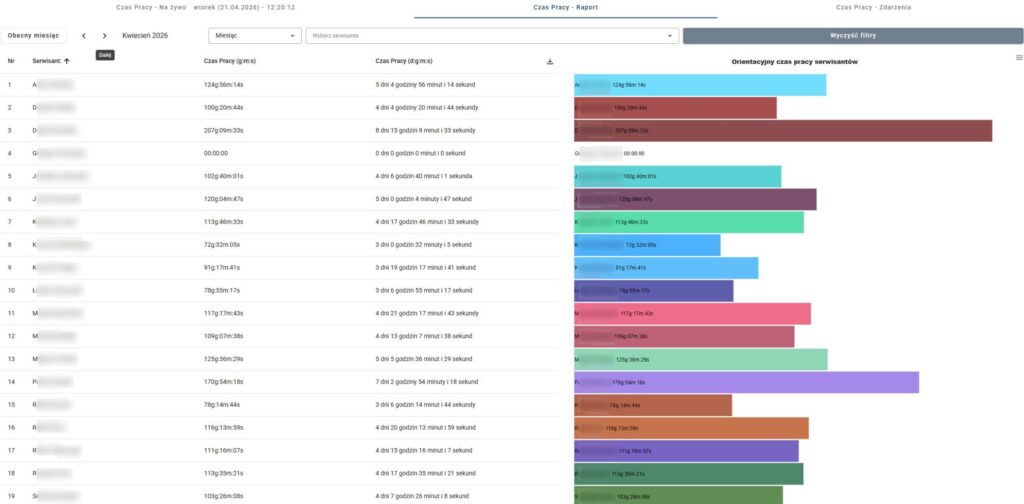
Working time overview for dispatchers
Dispatchers now have a clear monthly overview of technicians’ activity, where they can check the number of hours worked and see when each working day started and ended. This makes day-to-day planning easier and helps match tasks to the team better.
This is only the beginning of developing this area of the app!
Next, we plan to introduce live tracking, among other things – we will tell you more about it soon, together with further details and improvements.
System update – Form development 📄
Release date: 2026-06-10
What’s new in version 224?
The latest update brings new form configuration options that make it even easier to reflect your real service processes and collect exactly the data you need.
Multiple attachments in one form
The new feature lets you add multiple attachments of the same type to one main form.
Each attachment can be edited until the technicians add their final signatures. This makes it easy to fill in missing information, correct data or add further measurement results before the documentation is closed.
Drop-down lists with values and formulas
The new feature lets you assign your own values to items in drop-down lists. The selected options can then be used in formulas, conditions and automatic calculations performed by the system.
This makes forms more interactive: they can not only collect data, but also automatically analyze it, calculate results and show the user relevant messages depending on the information entered.


We develop the system primarily based on the needs of our customers and users. If you are missing a specific feature, have an idea for improving forms or want to better reflect the processes in your company – get in touch with us.
We are open to suggestions and regularly introduce new solutions that help you get even more out of the system.